 Koen Heye
Creating a component with the Sitecore AI Components API: three surprises

The POST returned 201. The GET afterwards returned exactly what I sent. The component still didn't work.
We needed a Product Lister component on a SitecoreAI project: Angular front end on the Content SDK, templates and renderings serialized with SCS. The data template already existed, migrated from the old XP solution with its original IDs. The new Components API promised to create the rendering in one call instead of me clicking through the Content Editor. It did create it. It also put it in the wrong folder, filled in a Datasource Location nobody asked for, and stored the GraphQL query in a field the Layout Service never reads.
A Sitecore Support case was opened to investigate this further.
What you need to know before the first call
The Components API was announced in the SitecoreAI changelog on 25 September 2026, together with the Content Types and Content Items APIs. The endpoint reference leaves out several of the things below. I got them from the API overview, the OpenAPI spec, or trial and error.
- Base URL:
https://edge-platform.sitecorecloud.io/authoring. This is not the Sites API host (xmapps-api.sitecorecloud.io), so don't reuse that one. - Authentication: an Automation client from Deploy → Credentials → Environment. You get the JWT from
https://auth.sitecorecloud.io/oauth/tokenwithaudience=https://api.sitecorecloud.io. It is the same kind of token you use for the Authoring and Management GraphQL API, not an Edge administration token. Fishtank's Postman guide to the SitecoreAI APIs keeps the two apart the same way. I explained the difference in an earlier post on Automation vs Edge administration tokens. - environmentId: the Deploy environment ID, passed as a query parameter on every call.
- category.id: the item ID of a folder under
/sitecore/layout/Renderings.GET /api/v1/component-categorieslists them with their paths. - modelId: the item ID of the datasource template. The spec calls it "content type ID".
- settings: a string map. For an existing component, GET returns the rendering's Other properties entries here (
IsAutoDatasourceRendering,IsRenderingsWithDynamicPlaceholders), plus the query from the Component GraphQL Query field under the keycomponentQuery. - Not in the request model: a parameters template.
renderingParameterstakes individual parameters (name plus editing control), not a reference to an existing parameters template.
An excerpt of what GET /api/v1/component-categories returns on our environment (IDs shortened):
[
  {
    "id": "12d005b8-…",
    "name": "Forms",
    "path": "/sitecore/layout/Renderings/Feature/JSS Experience Accelerator/Forms"
  },
  {
    "id": "05692d9f-…",
    "name": "FAQ Collection",
    "path": "/sitecore/layout/Renderings/Feature/Acme/Components/FAQ Collection"
  },
  {
    "id": "a86208cd-…",
    "name": "Products",
    "path": "/sitecore/layout/Renderings/Feature/Acme/SAP Commerce/Products"
  }
]
Tip: GET a component you built by hand before you create anything. It shows the exact shape the API expects and returns, which is faster than reading the spec.
The request
I used PowerShell and built the body as an object, so ConvertTo-Json handles the escaping of the multi-line query:
$body = @{
  name        = "Product Lister"
  displayName = "Product Lister"
  category    = @{ id = $categoryId }     # /Feature/Acme/SAP Commerce
  modelId     = $templateId               # Product Lister datasource template
  iconUrl     = "Office/32x32/dot_matrix.png"
  settings    = @{
    IsAutoDatasourceRendering = "false"
    componentQuery            = $query    # IGQL, see below
  }
  availability = @{ sites = @() }
} | ConvertTo-Json -Depth 5

Invoke-RestMethod -Method Post `
  -Uri "https://edge-platform.sitecorecloud.io/authoring/api/v1/components?environmentId=$envId" `
  -Headers @{ Authorization = "Bearer $token"; Accept = "application/json" } `
  -ContentType "application/json; charset=utf-8" -Body $body
The query follows the same pattern as our other components: a root alias datasource, fields as jsonValue, and the child Application Categories through children { results { … } }.
The call returned 201. The response included systemName: "ProductLister", which is the componentName to register in the front end's component map, and type: "Code".
So far so good. Then I opened the Content Editor.
Surprise 1: the category ID was not the one saved
I sent category.id = a80eb581-…, which is /sitecore/layout/Renderings/Feature/Acme/SAP Commerce.
On create, and on every GET afterwards, I got this back:
"category": {
  "id": "04429a85-…",
  "name": "SAP Commerce",
  "path": null
}
In the content tree, the rendering sat at /sitecore/layout/Renderings/Feature/SAP Commerce. The Acme level was gone.
Our reading, not confirmed: the API resolved the category to its name and then used or created Feature/<name>, ignoring where the category folder actually is. Nested category folders don't seem to be supported. The docs say the response returns "the persisted category". They don't say it can be a different one from the one you sent.
Why it matters: our renderings serialization module only covers Feature/Acme. The new rendering landed outside serialization and nothing complained. You find out when a colleague pulls and the component isn't there.
Workaround: move the rendering to the right folder, then delete the folder the API created. A move keeps the item ID, so the component still resolves.
Sitecore Support reproduced this one and registered it as a bug: DESIGNLIB-5349. More on the support case below.
Surprise 2: a Datasource Location appeared without being sent
The rendering came back with this Datasource Location:
query:$site/*[@@name='Data']/*[@@templatename='Product Lister Folder']|query:$sharedSites/*[@@name='Data']/*[@@templatename='Product Lister Folder']This one turned out not to be a bug. Our hand-built FAQ Collection rendering has the same pattern with FAQ Collection Folder. It's the headless SXA convention: a folder template named <datasource template> Folder, directly under the site's Data folder, with a $site | $sharedSites query so shared sites work too. The API generates it from the datasource template's name.
The catch: it only works if a template called Product Lister Folder exists and every site has that folder under Data. Neither existed yet, so editors couldn't create or pick a datasource. The picker just had nothing to show.
What to do: for every component you create this way:
- Create the
<Name> Foldertemplate, with the datasource template as its insert option. - Add an Add Headless Site Item step to your site setup (scaffolding) so each new site gets the folder under Data.
- Create the folder by hand in the sites that already exist.
The API follows an opinionated convention and doesn't document it. That's helpful once you know about it, and confusing until then.
Surprise 3: the GraphQL query went into the wrong field, and a GET hides it
After the create, the Content Editor shows this:
- Component GraphQL Query: empty.
- Other properties: contains a
componentQuery=…entry holding the whole query, URL-encoded.
For comparison, here is the hand-built FAQ Collection rendering, from its serialized YAML:
- ID: "<Component GraphQL Query field ID>"
Hint: ComponentQuery
Value: |
query { … }
- ID: "<Other properties field ID>"
Hint: OtherProperties
Value: IsAutoDatasourceRendering=false&IsRenderingsWithDynamicPlaceholders=true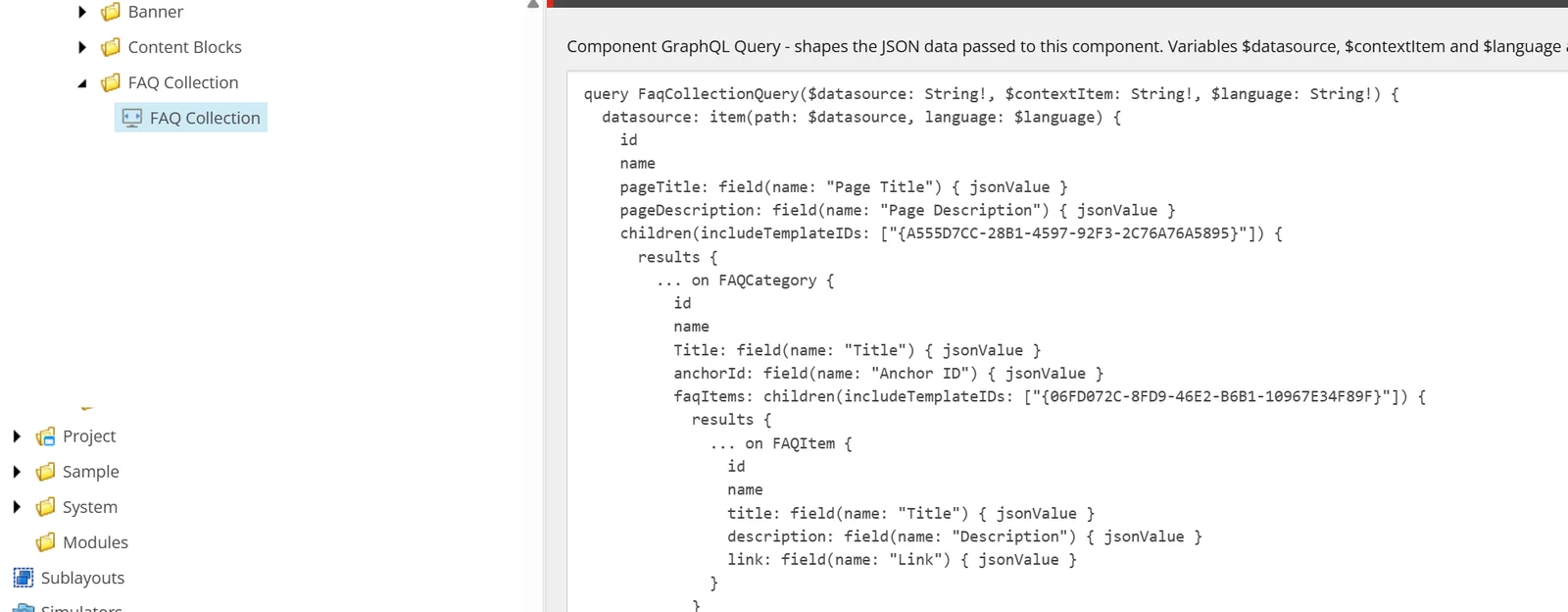 The hand-built FAQ Collection rendering: the query sits in the Component GraphQL Query field, where the Layout Service runs it.
So the API reads and writes this differently:
| Reads (GET) | Writes (POST) | |
|---|---|---|
| Other properties entries | into settings |
from settings |
| Component GraphQL Query field | into settings.componentQuery |
— |
settings.componentQuery |
— | into Other properties as componentQuery=… |
Why that's dangerous: a GET after creating returns the query exactly as you sent it, whichever field it's actually stored in. The round trip looks perfect. But the Layout Service only runs Integrated GraphQL from the Component GraphQL Query field. If that field is empty, you get the default datasource serialization. The component quietly falls back to normal JSS shaping. For Product Lister, that means the Application Categories children never reach the front end. No error, just missing data.
Workaround: paste the query into the Component GraphQL Query field in the Content Editor, and remove componentQuery=… from Other properties.
I did wonder whether a PATCH with the key ComponentQuery would write to the real field. Sitecore Support answered that one: setting the Component GraphQL Query is missing from the API altogether. It's registered as a feature request: DESIGNLIB-5350.
The support case
I opened a Sitecore Support case with both questions: the category that changed, and the query that ended up in the wrong field.
The case starts with an AI support agent these days. It was quick, and useful for confirming what the docs do and don't say. But it couldn't tell a stored value from one that's only echoed back: because GET returns the query, it wouldn't call the field "not settable". It did point to a fair alternative: the Authoring and Management GraphQL API can write any field on the rendering item with updateItem, including Component GraphQL Query. A second API in your script, but it writes to the right field.
So the case went to a live agent, who tested the API and confirmed both:
| Question | Answer | Reference |
|---|---|---|
| Component not created under the category you pass in | Reproduced, unexpected behaviour | Bug DESIGNLIB-5349 |
| Component GraphQL Query can't be set | Missing from the API altogether | Feature request DESIGNLIB-5350 |
So neither is something you are doing wrong. Feature requests are up to the product team, so no promises on timing there. If you run into either one, mention those references to Support. Until then, the checklist below is the workaround.
What still has to be done by hand
After the API call, this was my checklist for Product Lister:
- Move the rendering to the right category folder and delete the folder the API created.
- Put the query in Component GraphQL Query and remove
componentQuery=…from Other properties. - Create and assign the rendering parameters template, since the API has no field for it.
- Create the
<Name> Foldertemplate with the right insert option. - Add the folder to site scaffolding and create it in existing sites.
- Run a scoped
ser pullso everything ends up in the repo.
Points worth taking with you
- GET an existing component before creating one. It's the fastest way to learn what
category.id,modelIdandsettingsexpect. - Check the content tree, not only the API response. The response can agree with what you sent while the item sits somewhere else, or the value sits in another field.
- A matching GET doesn't prove the value is where Sitecore uses it. Check the Component GraphQL Query field itself, or the component's layout JSON. With IGQL working, our components get the query result under
fields.data. Without it, you just get the flat datasource fields. - Plan the SXA conventions in. The
<Name> Foldertemplate and the scaffolding step are part of every new component. - Don't count on nested category folders yet. Check where the rendering landed, especially if your serialization modules depend on the folder structure.
Bonus: a quick post-create check
Before you trust a component you created with the API, open the rendering item and check three fields: the item path, Datasource Location, and Component GraphQL Query. That takes 30 seconds. Debugging missing children on the front end took me considerably longer.
A promising API that saves clicking around, but be sure to check what happens in SitecoreAI before fully using it. Maybe I'm too old-school and I trust the content tree too much...
References
- SitecoreAI changelog: New SitecoreAI APIs now available: Components, Content Types, and Content Items (25 Sep 2026)
- Sitecore API catalog: Components API
- Sitecore API catalog: Sites API
- Integrated GraphQL in Content SDK apps
- Customizing the Layout Service rendering output
- Walkthrough: Building a simple custom component (Datasource Location query)
- Add modules to Site and Tenant scaffolding
- Use dynamic placeholders in components (Other properties)
- Query examples for authoring operations (updateItem)
- Walkthrough: Enabling and authorizing requests to the Authoring and Management API