 Koen Heye
Using tokens in Treelist Datasource field in SitecoreAI

I needed a category picker. Multi-select, grouped, and working for every site in a multi-site SitecoreAI solution. Sounds like a Tuesday. It became a small archaeology project.
The problem
The content looks like this:
Categories
├── Group folder A
│   ├── Category 1
│   └── Category 2
└── Group folder B
    └── Category 3
Editors must pick one or more categories, and they want to see the groups while doing it.
In the old XP solution this was a Grouped Droplist with a hard-coded path:
/sitecore/content/Sites/Acme/…Two issues. It is single-select. And a hard-coded path to one site is exactly what you don't want in a multi-site SitecoreAI setup. Copying the template per site is also not a plan, it is a punishment.
What didn't work
Multilist with a token query. The obvious first try:
query:$site/…/*The token resolves fine. But a Multilist only shows the direct children of its source. So editors got a nice list of… group folders. Not categories.
Multilist with a descendant query. Then:
query:$site/…//*[@@templateName='…']Now the categories are there, but as one flat list. The groups are gone. Technically correct, practically annoying.
The "known" fix: a custom field. The community has written about this for years. Kamruz Jaman showed in 2016 that a Treelist can't combine a query with parameters out of the box. Gert Gullentops built a "Tokened Treelist" in 2020 to get SXA tokens working together with Treelist parameters. Fishtank did the same for Headless SXA in 2024. That last one also needed a layout service serializer patch. Every time, that means a C# class, a config patch and a core database item.
In SitecoreAI that is platform code you have to build, deploy and maintain. For a picker.
What worked
Before writing any code, I just tried it with a standard Treelist. This is the Source:
DataSource=query:$site/*[@@name='Data']/*[@@templateName='SAP Commerce Mappings Folder']/*[@@templateName='Material Groups Folder']&IncludeTemplatesForSelection=Material Group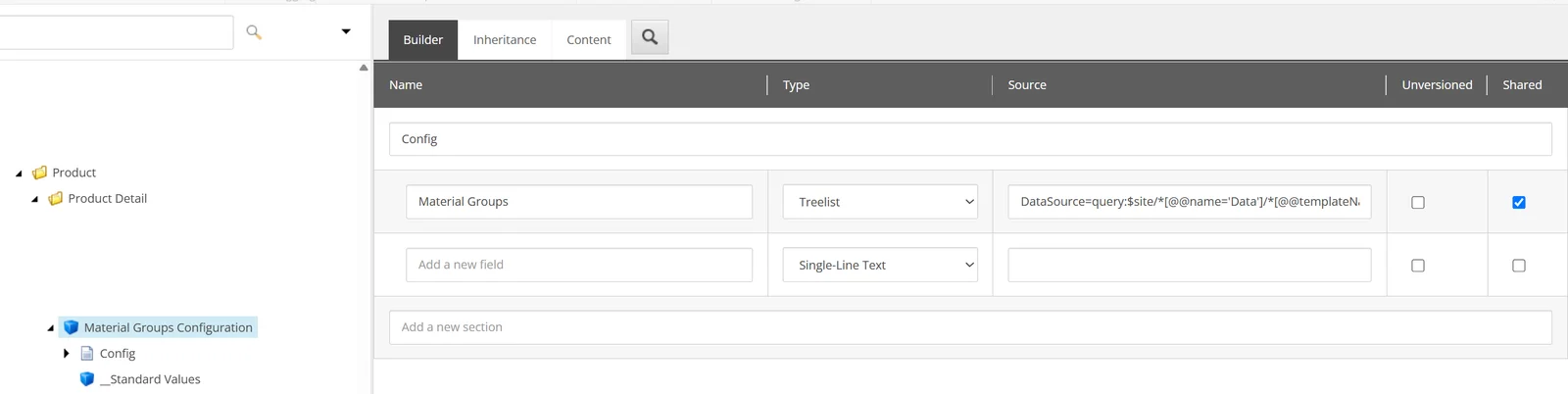 A plain Treelist field. The builder cuts off the Source, the full value is above.
And it works. The token resolves to the current site, the tree keeps its groups, and only items of the chosen template can be selected.
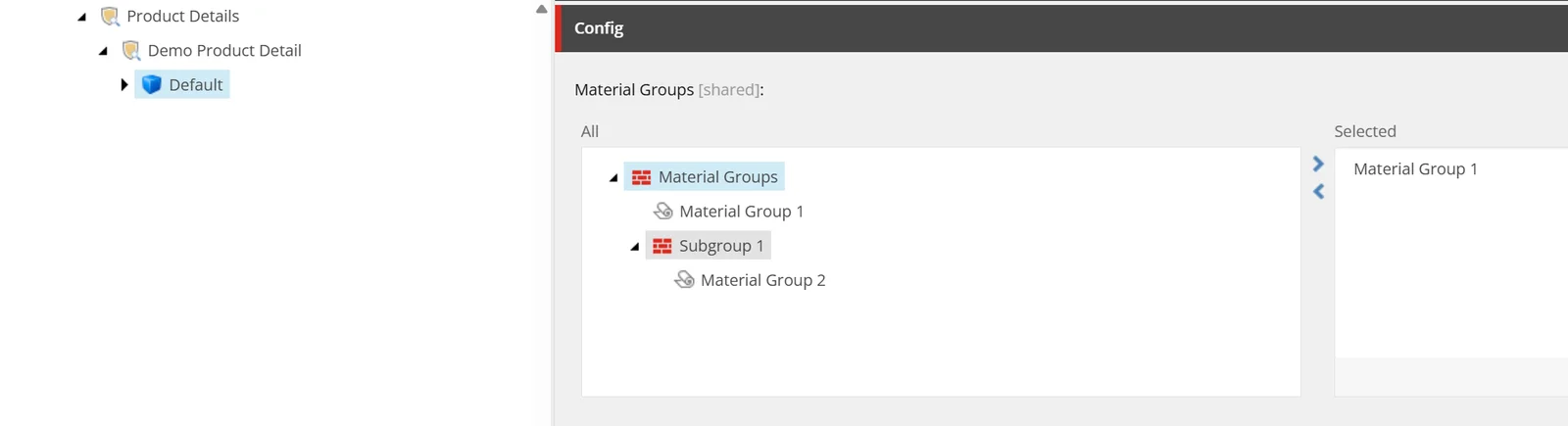 The groups stay in the tree, only the Material Group items can be selected.
No custom field. One field definition for every site.
To be clear: I can say this works in SitecoreAI today. I can't tell you whether it changed at some point or always worked in SitecoreAI. I did not find it in the documentation or the changelog either. So treat it as tested behaviour, not a documented feature.
Multilist vs Treelist
| Multilist | Treelist | |
|---|---|---|
| What it shows | Direct children of the source | The tree below the source |
| Grouped tree | Groups only, or a flat list with // |
Groups and items, as a tree |
| Multi-select | Yes | Yes |
| Restrict selectable templates | Via the query | IncludeTemplatesForSelection |
Token query (query:$site) |
Yes | Yes, inside DataSource= (tested in SitecoreAI) |
For a grouped tree: take the Treelist.
Small things that bite
IncludeTemplatesForSelection is a comma-separated list of template names. No spaces around the commas:
IncludeTemplatesForSelection=Template A,Template BA space inside a template name is fine (Material Group above works).
Tokens need a site context. $site is resolved for an item inside a site. On standard values there is no site, so SXA cannot resolve the token. Gert's custom field falls back to /sitecore/content in that case.
Scope of my test. I tested this in a TST environment, in the Content Editor, on a field of a datasource template. I did not test it for rendering parameters in Pages. The SitecoreAI docs also mention that IncludeTemplatesForSelection isn't supported in Pages yet.
Bonus: why this is on the datasource template
My first idea was to put this field on the rendering parameters. In SitecoreAI that is not a good idea for multi-select. The SitecoreAI docs page "Field types in rendering data" spells out the difference. For Multilist and Treelist fields, "The Layout Service resolves those GUIDs into item objects". For multi-value component parameters, you have to "split on the comma , or the pipe symbol |" yourself. So the rendering parameters arrive in the front end as raw GUIDs. The front end gets a pipe-separated string of IDs and has to figure out the rest itself.
On a datasource template the field is a normal Treelist field, and the front end gets the items it expects. That is a story for another post.
Before you build a custom field type in SitecoreAI, try the standard one first. Sometimes the old workaround is no longer needed. Nobody told you, but it still counts.
References
- Gert Gullentops, Miauw: SXA tokens in a Sitecore Treelist datasource (2020): https://ggullentops.blogspot.com/2020/10/sxa-tokens-in-sitecore-treelist.html
- Fishtank: SXA Tokens in Sitecore Treelist Datasource (2024): https://www.getfishtank.com/insights/multisite-sxa-tokens-for-sitecore-treelist-datasources
- jammykam: Specifying query and parameters for Sitecore Treelist Field Source (2016): https://jammykam.wordpress.com/2016/01/06/specifying-query-and-parameters-for-sitecore-treelist-field-source/
- Sitecore docs (SitecoreAI): Controlling the list of items in a Selection field: https://doc.sitecore.com/xmc/en/developers/xm-cloud/controlling-the-list-of-items-in-a-selection-field.html
- Sitecore docs (XP 10.5): Controlling the list of items in a Selection field: https://doc.sitecore.com/xp/en/developers/105/sitecore-experience-manager/controlling-the-list-of-items-in-a-selection-field.html
- Sitecore docs (SitecoreAI): The simple field types: https://doc.sitecore.com/xmc/en/developers/xm-cloud/the-simple-field-types.html
- Sitecore docs (XP SXA): Use a query to determine the data source context: https://doc.sitecore.com/xp/en/developers/sxa/latest/sitecore-experience-accelerator/use-a-query-to-determine-the-data-source-context.html
- Sitecore docs (SitecoreAI): Recommendations: Extending SXA: https://doc.sitecore.com/xmc/en/developers/xm-cloud/recommendations--extending-sxa.html
- Fishtank: Expand Link Field Rendering Parameters In Layout Service: https://www.getfishtank.com/insights/expand-link-field-rendering-parameters-in-layout-service