 Koen Heye
Sitecore XM Cloud - adding an additional database
I was experimenting with having multiple master databases in a local XM Cloud environment. The reason for this was that I wanted to try out copying of items from 1 database to another through the use of PowerShell.
Since both databases would be in the same Sitecore solution, this would make it a whole lot easier to move items.
And apparantly, I was not the only one with that idea! I found some other references online of people that set this up:
Custom Connection Strings in Sitecore on Docker: A Developer’s Guide
Experience Sitecore ! | XM Cloud content migration: connecting external database
I didn't have any luck with the documentation in those blog posts. So here is some additional inforamtion on how to get it working. The database I'm trying to add is called Legacy. So besides core, master and web; we'll have legacy as well.
Steps
- Add connectionstring to docker-compose.yml
Sitecore_ConnectionStrings_Legacy: Data Source=${SQL_SERVER};Initial Catalog=${SQL_DATABASE_PREFIX}.Legacy;User ID=${SQL_SA_LOGIN};Password=${SQL_SA_PASSWORD}- Add a transform to the docker cm build. Eg. \docker\build\cm\transforms\Web.CustomConnectionStrings.config
<configuration xmlns:xdt="http://schemas.microsoft.com/XML-Document-Transform">
    <configBuilders>
        <builders>
            <add name="SitecoreConnectionStringsBuilder"
                mode="Greedy"
                prefix="SITECORE_CONNECTIONSTRINGS_"
                stripPrefix="true"
                type="Microsoft.Configuration.ConfigurationBuilders.EnvironmentConfigBuilder, Microsoft.Configuration.ConfigurationBuilders.Environment, Version=1.0.0.0, Culture=neutral"
                xdt:Transform="SetAttributes" xdt:Locator="Match(name)" />
        </builders>
    </configBuilders>
</configuration>- Change the Dockerfile to add code to perform the transform.
# Copy transforms and invoke them
COPY .\transforms c:\transforms
RUN c:\tools\scripts\Invoke-XdtTransform.ps1 -Path 'C:\inetpub\wwwroot\Web.config' -XdtPath 'C:\transforms\Web.CustomConnectionStrings.config'- Add a config file to define the 'Legacy' database. \App_Config\Include\ZZZ\z.LegacyDatabase.config
z.LegacyDatabase.config
<?xml version="1.0" encoding="UTF-8"?>
<configuration xmlns:patch="http://www.sitecore.net/xmlconfig/">
<sitecore>
<eventing defaultProvider="sitecore">
<eventQueueProvider>
<eventQueue name="Legacy" patch:after="eventQueue[@name='web']" type="Sitecore.Data.Eventing.$(database)EventQueue, Sitecore.Kernel">
<param ref="dataApis/dataApi[@name='$(database)']" param1="$(name)"/>
<param ref="PropertyStoreProvider/store[@name='$(name)']"/>
</eventQueue>
</eventQueueProvider>
</eventing>
<PropertyStoreProvider>
<store name="Legacy" patch:after="store[@name='master']" prefix="Legacy" getValueWithoutPrefix="true" singleInstance="true" type="Sitecore.Data.Properties.$(database)PropertyStore, Sitecore.Kernel">
<param ref="dataApis/dataApi[@name='$(database)']" param1="$(name)"/>
<param resolve="true" type="Sitecore.Abstractions.BaseEventManager, Sitecore.Kernel"/>
<param resolve="true" type="Sitecore.Abstractions.BaseCacheManager, Sitecore.Kernel"/>
</store>
</PropertyStoreProvider>
<databases>
<database id="Legacy" patch:after="database[@id='master']" singleInstance="true" type="Sitecore.Data.DefaultDatabase, Sitecore.Kernel">
<param desc="name">$(id)</param>
<icon>Images/database_master.png</icon>
<dataProviders hint="list:AddDataProvider">
<dataProvider type="Sitecore.Data.DataProviders.CompositeDataProvider, Sitecore.Kernel">
<param hint="list" desc="readOnlyDataProviders">
<protobufItems type="Sitecore.Data.DataProviders.ReadOnly.Protobuf.ProtobufDataProvider, Sitecore.Kernel">
<databaseName>$(id)</databaseName>
<filePaths hint="list">
<filePath>/App_Data/items/$(id)</filePath>
<!-- <modulesFilePath>/sitecore modules/items/$(id)</modulesFilePath> -->
</filePaths>
</protobufItems>
</param>
<param desc="headProvider">
<dataProvider ref="dataProviders/main" param1="$(id)">
<prefetch hint="raw:AddPrefetch">
<childLimit>100</childLimit>
<logStats>false</logStats>
<template group="template1" desc="template">{AB86861A-6030-46C5-B394-E8F99E8B87DB}</template>
<template group="template2" desc="template section">{E269FBB5-3750-427A-9149-7AA950B49301}</template>
<template group="template3" desc="template field">{455A3E98-A627-4B40-8035-E683A0331AC7}</template>
<template group="other" desc="language">{F68F13A6-3395-426A-B9A1-FA2DC60D94EB}</template>
<template group="other" desc="device">{B6F7EEB4-E8D7-476F-8936-5ACE6A76F20B}</template>
<item group="other" desc="root">{11111111-1111-1111-1111-111111111111}</item>
<children group="other" desc="main sections">{11111111-1111-1111-1111-111111111111}</children>
<cacheSize>200MB</cacheSize>
<template group="other" desc="menu item">{998B965E-6AB8-4568-810F-8101D60D0CC3}</template>
<template group="other" desc="workflow">{1C0ACC50-37BE-4742-B43C-96A07A7410A5}</template>
<template group="other" desc="state">{4B7E2DA9-DE43-4C83-88C3-02F042031D04}</template>
<template group="other" desc="command">{CB01F9FC-C187-46B3-AB0B-97A8468D8303}</template>
<template group="other" desc="action">{66882E97-C8AA-4E37-8901-7A8AA35ED2ED}</template>
<item group="other" desc="home">{110D559F-DEA5-42EA-9C1C-8A5DF7E70EF9}</item>
<!-- Rules -->
<template group="rules" desc="Action">{F90052A5-B4E6-4E6D-9812-1E1B88A6FCEA}</template>
<template group="rules" desc="Condition">{F0D16EEE-3A05-4E43-A082-795A32B873C0}</template>
<template group="rules" desc="Conditional Rendering Rule">{550B5CEF-242C-463F-8ED5-983922A39863}</template>
<template group="rules" desc="Content Editor Warning Rule">{71A2C881-FBB3-4A23-A187-7FD50A20F924}</template>
<template group="rules" desc="Insert Options Rule">{664E5035-EB8C-4BA1-9731-A098FCC9127A}</template>
<template group="rules" desc="Rule">{D9BDF22F-6E17-47F3-AB64-49C717BA92DA}</template>
<template group="rules" desc="Script">{AB6DD55D-75E3-4A02-9793-7054ED90FCB6}</template>
<template group="rules" desc="Element Folder">{54DAE7CD-BFD8-4E69-9679-75F2AE9F9034}</template>
<template group="rules" desc="Rule Elements Visibility Rule">{271F5CF1-95C7-474D-9F04-06C6EBB20D8F}</template>
<template group="rules" desc="Rules Context Folder">{DDA66314-03F3-4C89-84A9-39DFFB235B06}</template>
<template group="rules" desc="Rules Folder">{8EA2CF67-4250-47A2-AECA-4F70FD200DC7}</template>
<template group="rules" desc="Tag">{1A9B6300-4652-477C-A4B5-B2A64E86B29F}</template>
<template group="rules" desc="Tags Definition">{854BA861-63EA-4A0C-8C7B-541E9A7EC4C1}</template>
<template group="rules" desc="Tags Definitions Folder">{96C8E5DD-63C3-496B-A97C-A3E37E1DACBA}</template>
<template group="rules" desc="Visibility">{AA91A868-02F2-41D3-8B78-1CAD91B4DCAE}</template>
<template group="rules" desc="Validation Result">{29045375-C15F-4E69-B873-75C3F5C1814B}</template>
<template group="rules" desc="Validation Rule">{0512BDE9-5696-42C4-8C7D-B349EDA9CEF9}</template>
</prefetch>
</dataProvider>
</param>
</dataProvider>
</dataProviders>
<securityEnabled>true</securityEnabled>
<PropertyStore ref="PropertyStoreProvider/store[@name='$(id)']"/>
<remoteEvents.EventQueue>
<obj ref="eventing/eventQueueProvider/eventQueue[@name='$(id)']"/>
</remoteEvents.EventQueue>
<!-- <proxiesEnabled>false</proxiesEnabled> -->
<archives hint="raw:AddArchive">
<archive name="archive"/>
<archive name="recyclebin"/>
</archives>
<cacheSizes hint="setting">
<data>100MB</data>
<items>50MB</items>
<paths>2500KB</paths>
<itempaths>50MB</itempaths>
<standardValues>2500KB</standardValues>
</cacheSizes>
</database>
</databases>
</sitecore>
</configuration>-
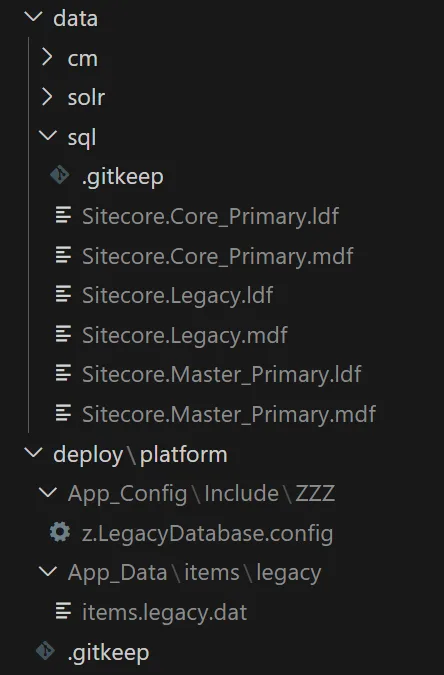
Another change that was needed is adding a items.dat file. I'm sorry, didn't find the exact error I had in my notes anymore 😦 In deploy\platform, add the file: \App_Data\items\legacy\items.legacy.dat
Which is a file copied from items.master.dat from the environment the database is coming from.
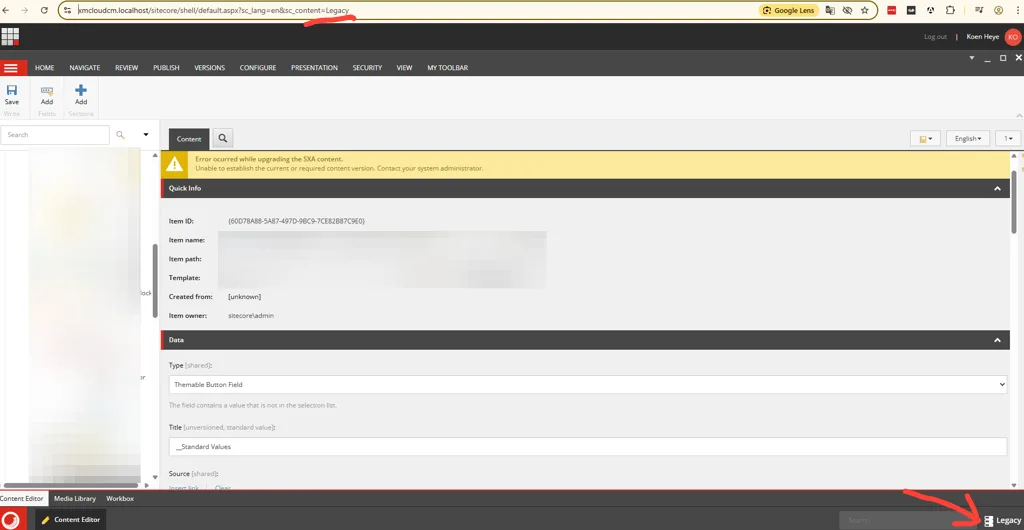
Final result
I have an additional database at my disposal!
Bonus: Elevate PowerShell session
To start using PowerShell locally, you'll have to elevate your powershell session.
The way to do this for local instances is:
- Add
SITECORE_SPE_ELEVATION: "Allow"to yourdocker-compose.override.ymlfile:
services:
  cm:
    environment:
SITECORE_SPE_ELEVATION: "Allow"- Run
./down.ps1in your terminal - Run
./up.ps1in your terminal
Sources:
Bonus 2: PowerShell to copy items
Copy-Item -Path master:\content\Home -Destination web:\content\home -TransferOptions 0Source: